Alarm Tags Are Now Part of Your Paging Path
The lookup table that decides who gets paged
Once an AWS environment has more than a handful of teams, alerts tend to flow through a shared pipeline: every alarm publishes to one SNS topic, and a Lambda function behind it works out who to page. The function can’t read the owner from the message, because the state-change payload has never included the alarm’s tags. So it guesses. Some teams parse the alarm name and depend on a naming convention that half the organization ignores. Others keep a DynamoDB table or a YAML file that maps alarm names to on-call rotations, and it drifts every time someone creates an alarm without updating it. The careful ones call ListTagsForResource on every event, which adds an API call, an IAM permission, and a failure mode to the one path that has to work while everything else is breaking.
All three approaches fail the same way. An alarm nobody mapped lands in a default channel, sits there, and gets noticed when the incident review asks why no one responded.
On October 20, AWS removed the reason those workarounds exist. If you’d rather read code first, the sample repo routes alarms on their tags in CloudFormation, CDK, or Terraform.
What AWS shipped
CloudWatch alarms can now include their tags in the payloads they send to Amazon SNS, AWS Lambda, and Amazon EventBridge on every state change (announcement). It works for metric, composite, and log alarms, it’s off by default, and you turn it on per alarm. You can send all tags, only the keys you list, or every tag except the keys you exclude.
In the API, the setting is AlarmTagsPropagation inside the ActionConfiguration parameter of PutMetricAlarm, PutCompositeAlarm, and PutLogAlarm. In the console, it’s a checkbox under the tag editor when you create or edit an alarm (docs).
Each payload also carries a status field with one of four values: SUCCESS, NO_TAGS, TRUNCATED when the tags didn’t fit the payload size limit, or FAILURE when CloudWatch couldn’t read them. On a failure the notification still goes out, without tags.
The feature is available in every Region where CloudWatch runs except Middle East (UAE) and Middle East (Bahrain).
Routing on tags without writing a router
EventBridge is where I’d look first. It receives alarm state-change events by default, even when the alarm has no actions configured, and the tags arrive as a plain key-value object under detail.alarmTags (event example). A rule can match on ownership directly:
{
  "source": ["aws.cloudwatch"],
  "detail-type": ["CloudWatch Alarm State Change"],
  "detail": {
    "state": { "value": ["ALARM"] },
    "alarmTags": {
      "Team": ["payments"],
      "Environment": ["prod"]
    }
  }
}
You write one rule per team, each pointing at that team’s paging target. The routing logic that lived in a Lambda function and a lookup table becomes a set of event patterns you can review in a pull request. If you still want a function for enrichment or deduplication, it reads the owner from the message instead of looking it up.
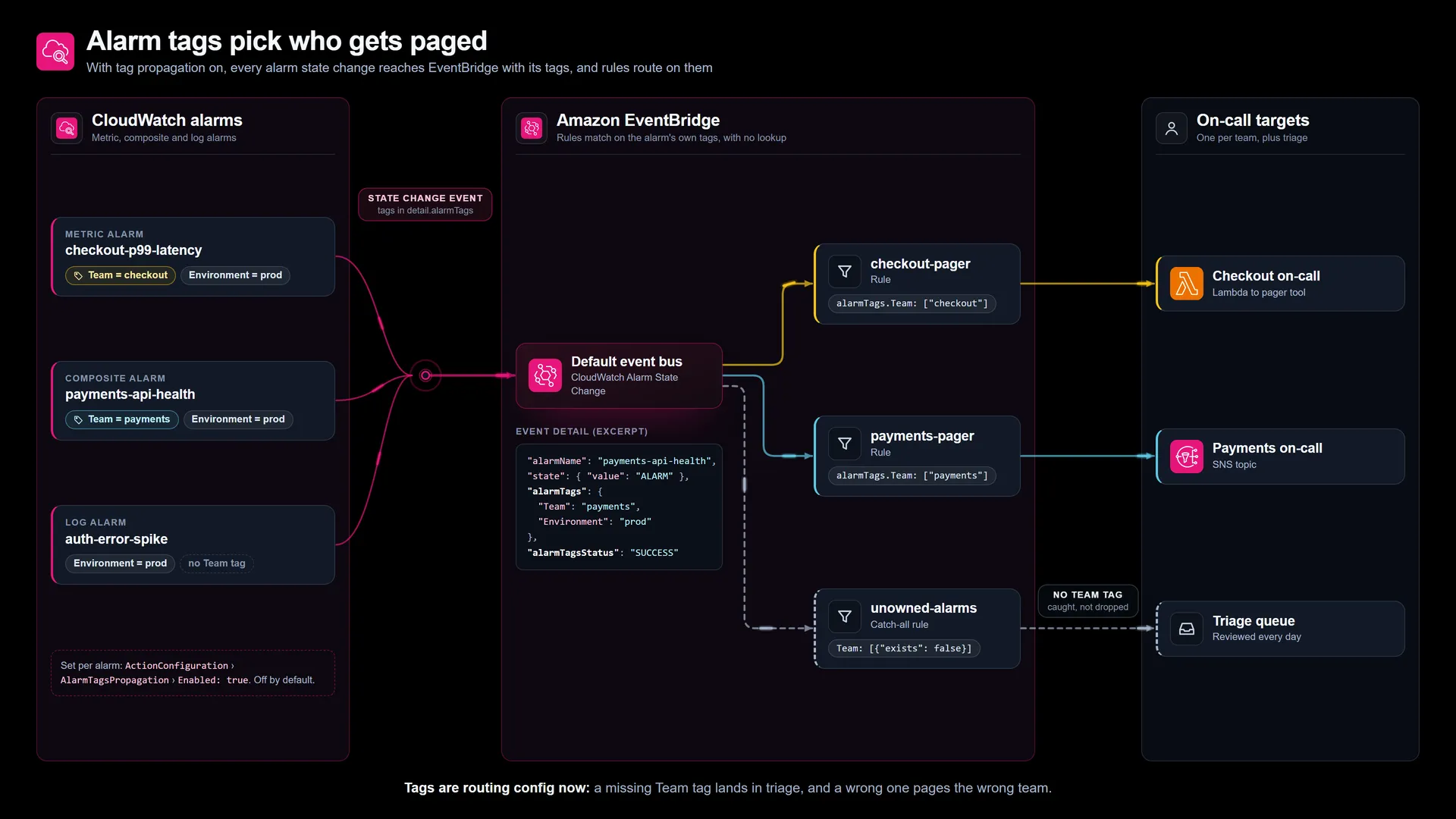
The alarm names, teams, and targets are my example. The part that comes from AWS is the event shape: the tags sit under detail.alarmTags, next to alarmTagsStatus.
These rules are in a sample repo in CloudFormation, CDK, and Terraform, with the catch-alls, tagged demo alarms you can fire to watch the routing, and an audit script for alarms that can’t be routed.
Tags just became production configuration
I think teams will underestimate what this does to their tags. Until now, tags on an alarm mostly fed cost reports and the occasional console filter, so a wrong tag broke nothing. Once routing reads them, a typo in a Team value or a missing Environment tag sends a page to the wrong people or to nobody. That makes the tag as important as the alarm threshold, and it deserves the same treatment: defined in infrastructure as code, reviewed, and checked.
In practice that means putting the ownership tags in the module or construct that creates alarms, so no alarm exists without them. It also means adding a catch-all EventBridge rule for ALARM events that match no team and sending those somewhere a person looks every day, because an unmatched event is the new unmapped alarm. Since propagation is off by default and set per alarm, enable it in that same module too; the cloudwatch:AlarmTagsPropagationEnabled condition key controls who can turn it on, and a scheduled check of DescribeAlarms output will catch the alarms someone created by hand.
What I’d check before turning it on
SNS delivers the tags to every subscriber on the topic, including email and HTTPS endpoints. If your tags hold internal owner names, cost centers, or anything you wouldn’t send to a vendor’s webhook, exclude those keys.
Tags that start with aws: are never propagated. That rules out aws:cloudformation:stack-name and the other system tags, so if your current routing keys off the stack that created the alarm, copy that value into a tag of your own.
An include list is closed and an exclude list is open. With an include list, a tag you add later won’t appear in the payload until you add its key to the list; with an exclude list, it shows up immediately. I’d use include where the payload leaves your control, like SNS email, and exclude where the consumer is your own code.
Tags only ride on SNS, Lambda, and EventBridge. Systems Manager OpsItems, Incident Manager incidents, EC2 actions, and Auto Scaling actions don’t receive them, so if you open incidents straight from alarm actions and want tag-based routing, move that path to EventBridge.
Each payload reflects the tags at the moment of the state change. That’s the behavior you want, but it also means retagging an alarm changes where its next page goes, so treat tag changes on alarms like changes to the paging rules.
At the time of writing, the SNS notification schema shows the AlarmTags field only on the log alarm schema, while the feature page says metric and composite alarms are supported too. Send a test notification and inspect the real message before you write a parser against it.
Where I’d start
Pick the shared alert topic with the longest routing function behind it. List the alarms that publish to it and count how many already carry a consistent owner tag; that count tells you how much cleanup stands between you and deleting the lookup table. Fix the tags in code, enable propagation on those alarms, and add one EventBridge rule per team plus the catch-all. When the catch-all has stayed quiet for a couple of weeks, retire the old router.
How does your team decide who gets paged today: a naming convention, a lookup table, or something else?
Sources
- Amazon CloudWatch Alarms now supports tags in alarm actions payload, AWS What’s New, Oct 20, 2026
- Alarm tags in action payloads, Amazon CloudWatch User Guide
- Alarm events and EventBridge, Amazon CloudWatch User Guide
- Sample code for this post, GitHub
- Notify users on alarm changes, Amazon CloudWatch User Guide
The opinions on this blog are my own and do not represent the views of my employer.