Account-Level Retention Policies in CloudWatch Logs
Never expire is the default nobody chose
Every new CloudWatch Logs log group keeps its events forever unless someone sets a retention period. Lambda functions, ECS tasks, VPC flow logs and many other services create log groups on their own, and most of them never get that setting. Teams patch it after the fact: the AWS Config rule cw-loggroup-retention-period-check with a remediation, an EventBridge rule on CreateLogGroup that triggers a Lambda function calling PutRetentionPolicy, or a nightly script that walks every log group in every Region.
Each of those fixes the number, and none of them owns the decision. The application team’s template says 14 days, the remediation says 90, and the security team asked for a year on anything that looks like an audit trail. Whoever ran last wins.
On November 9, AWS moved that decision to the account. If you’d rather read code first, the sample repo plans and creates a set of retention policies in CloudFormation, CDK, or Terraform.
What AWS shipped
CloudWatch Logs now supports account-level retention policies (announcement). They’re a new type for the existing PutAccountPolicy API: policyType is RETENTION_POLICY, and the policy document holds retentionInDays and enforcementMode (API reference). NEW_ONLY applies to log groups created after the policy. RETROACTIVE applies to every matching log group, including the ones that already exist.
A policy covers every log group in the Region, or the ones whose names start with a prefix in selectionCriteria. Prefixes are the only filter. You can have up to 20 policies per Region, and unlike other account policy types they can overlap: when several match, the longest retention wins, and NEVER_EXPIRE counts as the longest. The minimum is 30 days. DescribeLogGroups reports the policy in effect as retentionPolicyName.
A policy takes effect 24 hours after you create or change it. PutAccountPolicy and DeleteAccountPolicy accept dryRun, which creates nothing and returns how many log groups would get a longer, shorter or unchanged retention period, plus the 20 matching log groups that store the most data (user guide). Creating a policy needs logs:PutAccountPolicy and logs:PutRetentionPolicy. It’s available at no extra cost in every commercial Region except Middle East (Bahrain) and Middle East (UAE).
What it looks like in code
A one-year policy for security log groups, previewed before it exists:
aws logs put-account-policy \
  --policy-name security-1-year \
  --policy-type RETENTION_POLICY \
  --policy-document '{"retentionInDays": 365, "enforcementMode": "RETROACTIVE"}' \
  --selection-criteria 'LogGroupNamePrefix="/security"' \
  --dry-run
Three days after the launch, no infrastructure-as-code tool can write that policy. The live CloudFormation schema for AWS::Logs::AccountPolicy still lists five policy types, without RETENTION_POLICY. Terraform’s aws_cloudwatch_log_account_policy validates policy_type against the AWS SDK for Go, and provider v6.73.0, released November 11, pins a version from before the new type. The awscc provider follows the CloudFormation schema. The SDKs have it, from boto3 1.43.125 onward.
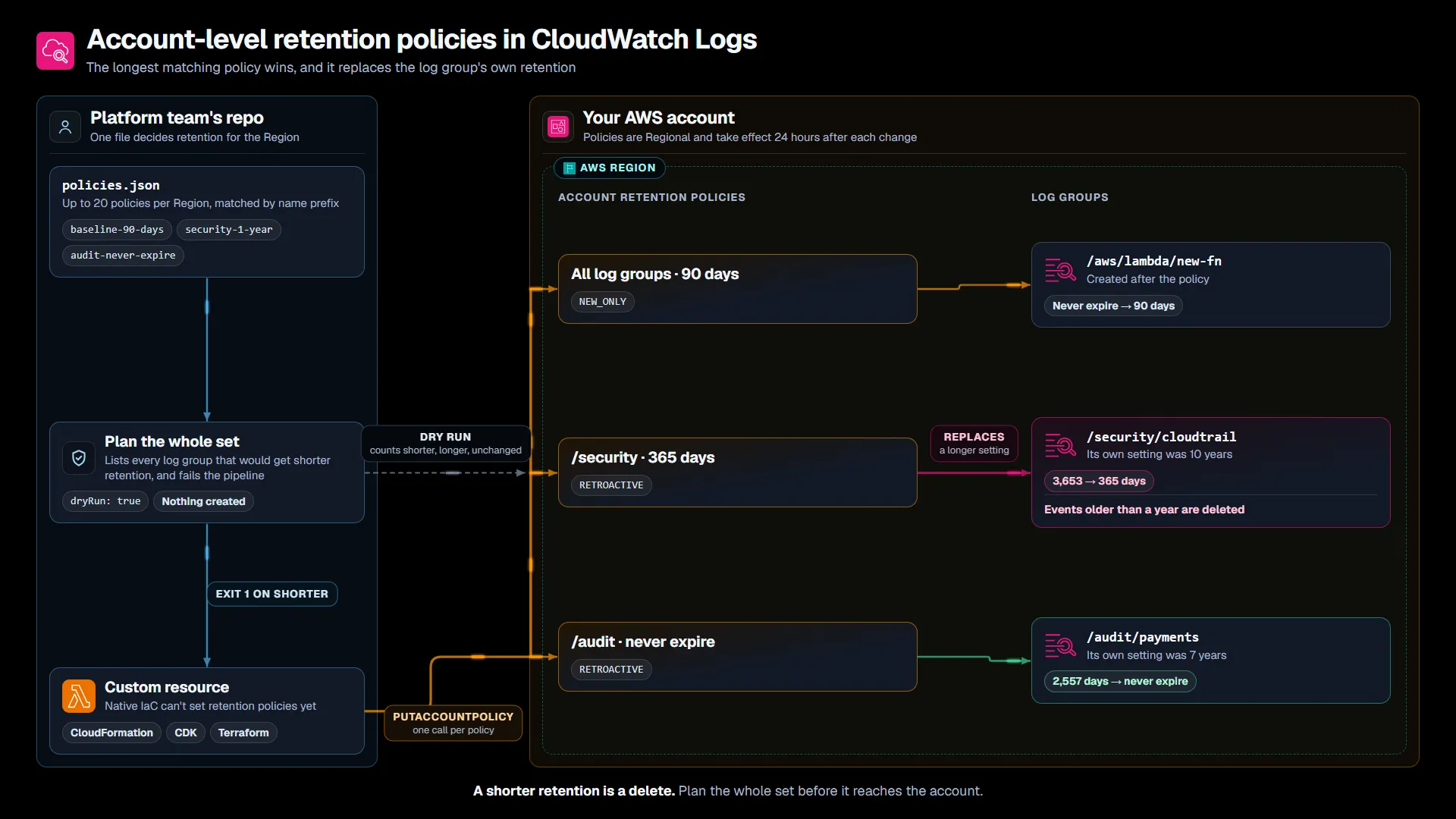
The prefixes, log groups and retention periods are my example. The matching rules, the override and the dry run come from the AWS documentation.
The sample repo keeps the policies in one JSON file and creates them through a small custom resource until the native resources catch up. Its plan script reads every log group in the Region, applies the same matching rules, lists each log group whose retention would get shorter, and exits 1 so a pipeline stops there.
A short retention policy is a delete order
The announcement says these policies help teams “bring each log group in line with their retention standards.” Bringing a log group in line can mean shortening it. The user guide’s warning is specific: an account-level policy replaces the retention set on a log group, including when the log group’s own setting is longer. Its example is a log group set to 10 years that gets a 90-day policy, after which CloudWatch Logs deletes everything older than 90 days.
So the dangerous policy in a set is the short baseline, and the exceptions are what protect you from it. The longest-wins rule only helps if the long policy exists and its prefix matches. Log groups can’t be renamed, so a security log group that someone named /aws/vendedlogs/... years ago won’t match /security, and it gets the baseline.
The dry run doesn’t settle this on its own. I ran it against my own account, which has two log groups set to never expire. A 90-day RETROACTIVE baseline reported both as shorter. Then I previewed a NEVER_EXPIRE policy for their prefix alongside it, and the baseline’s dry run still reported two shorter. It previews one policy against the policies that already exist, not the others in the same change. That answers “what does this policy do to my account today?” Before a deploy, the question is “what does this set do?”, and you have to work that out yourself.
I think this is the right place for retention to live. One file per Region beats a remediation function fighting application templates. But it moves a delete decision from the people who own each log group to whoever can call PutAccountPolicy, and an application team’s RetentionInDays becomes a suggestion under any RETROACTIVE policy that matches it. AWS’s own API reference says to grant logs:PutAccountPolicy only to administrators. I’d treat the policy file like a deletion schedule: reviewed, planned against every log group, and owned by someone who can say why /security keeps a year.
What I’d check before turning it on
Plan the policies as a set. Run the dry run for each policy, and also compute the combined result across all of them against every log group. That’s what the repo’s script does in CI, and it fails when anything gets shorter until someone passes --allow-decrease.
Start with NEW_ONLY. A NEW_ONLY baseline stops the never-expire problem from growing without touching a single existing log group. Switch to RETROACTIVE once the plan’s list of shorter log groups has been read by the people who own them.
Ship the exceptions with the baseline. Put the long and NEVER_EXPIRE policies in the same change as the short one, and check every log group whose name doesn’t follow your prefixes. Each one that needs its own exception uses one of the 20 policies.
Use the 24-hour delay. A new or changed policy takes effect a day later, and the old retention applies until then. That’s your window to delete a policy you got wrong. After a retention period lapses, CloudWatch Logs typically deletes the events within 72 hours, and they don’t come back.
Create the policies in every Region you use. They’re Regional, and a baseline in us-east-1 does nothing for log groups in eu-west-1. Bahrain and UAE don’t support them yet, so keep the old remediation there.
Restrict who can change them. logs:PutAccountPolicy with logs:PutRetentionPolicy is now a way to delete logs across the account. If you use the sample’s custom resource, the same goes for lambda:InvokeFunction on that function.
Where I’d start
Pick one account with a mix of service and application log groups. Write the baseline you want and the exceptions you know about, and run the plan in RETROACTIVE mode without deploying anything. The list of log groups that would get shorter is what you’re after: it shows where your naming doesn’t match your retention intent.
Then deploy the set with a NEW_ONLY baseline and RETROACTIVE exceptions, fix the names the plan found, and switch the baseline once the list is empty or accepted. When every log group in the Region reports a retentionPolicyName, the old Config remediation or CreateLogGroup function has nothing left to do, and you can retire it.
Which of your log groups keeps logs longer than your baseline, and does anyone still know why?
Sources
- Amazon CloudWatch Logs announces account-level retention policies, AWS What’s New, Nov 9, 2026
- Working with log groups and log streams, Amazon CloudWatch Logs User Guide
- PutAccountPolicy, Amazon CloudWatch Logs API Reference
- DryRunResult, Amazon CloudWatch Logs API Reference
- AWS::Logs::AccountPolicy, AWS CloudFormation Template Reference
- Sample code for this post, GitHub
The opinions on this blog are my own and do not represent the views of my employer.