AWS DevOps Agent Now Takes Questions in Your Incident Channel
An incident with two timelines
Most serious incidents end up with two timelines. The people talk in Slack: who’s on it, what changed, whether to roll back. The investigation happens somewhere else, in consoles, dashboards and, lately, the AWS DevOps Agent web app. Someone pastes a screenshot of a graph into the channel, someone else asks a question the agent already answered in its own console, and the incident review afterwards stitches the two stories back together.
AWS DevOps Agent could already post its findings to Slack, but only one way. To ask a follow-up question, you left the channel, opened the agent, and came back with a summary that was out of date by the time you pasted it.
On September 11, AWS removed that round trip. If you’d rather read code first, the sample repo sets up an Agent Space and a two-way Slack channel in CloudFormation, CDK, or Terraform.
What AWS shipped
AWS DevOps Agent now supports bidirectional communication in Slack (announcement). You mention the agent in a connected private channel, and it replies in a thread. From there you can start and steer investigations, ask about resources, metrics, alarm status and deployment history, and review its prevention recommendations. Everything the team and the agent add stays in that one thread.
Each Region has its own Slack app (user guide), such as AWS DevOps Agent - US East (N. Virginia). You turn on Bidirectional mode when you associate a channel with an Agent Space, give the association an IAM role, and bind the channel once with @AWS DevOps Agent - <Region> setup. Then you mention the app in every message, including replies inside the thread. Two-way chat works only in private channels, and public channels stay notification-only.
It’s available in every commercial Region where DevOps Agent is supported. Agent time is billed per second at $0.0083 per agent-second, and chat counts as an on-demand SRE task (pricing). That’s about $30 for every hour the agent spends working.
What it looks like in code
Everything except the Slack workspace registration can live in infrastructure as code. Registration is an OAuth flow in the console. The channel itself is an AWS::DevOpsAgent::Association with a Bidirectional block, and Terraform users get the same shape through awscc_devopsagent_association:
SlackChannel:
  Type: AWS::DevOpsAgent::Association
  Properties:
    AgentSpaceId: !Ref AgentSpace
    ServiceId: !Ref SlackServiceId
    Configuration:
      Slack:
        WorkspaceId: !Ref SlackWorkspaceId
        WorkspaceName: !Ref SlackWorkspaceName
        TransmissionTarget:
          IncidentResponseTarget:
            ChannelId: !Ref SlackChannelId
        Bidirectional:
          Enabled: true
          RoleArn: !GetAtt ChannelRole.Arn
The CloudFormation reference doesn’t describe RoleArn yet (“Property description not available”). The Terraform provider’s docs do: it’s the role the agent assumes to exchange messages with Slack for that association, and it matters more than anything else in the block.
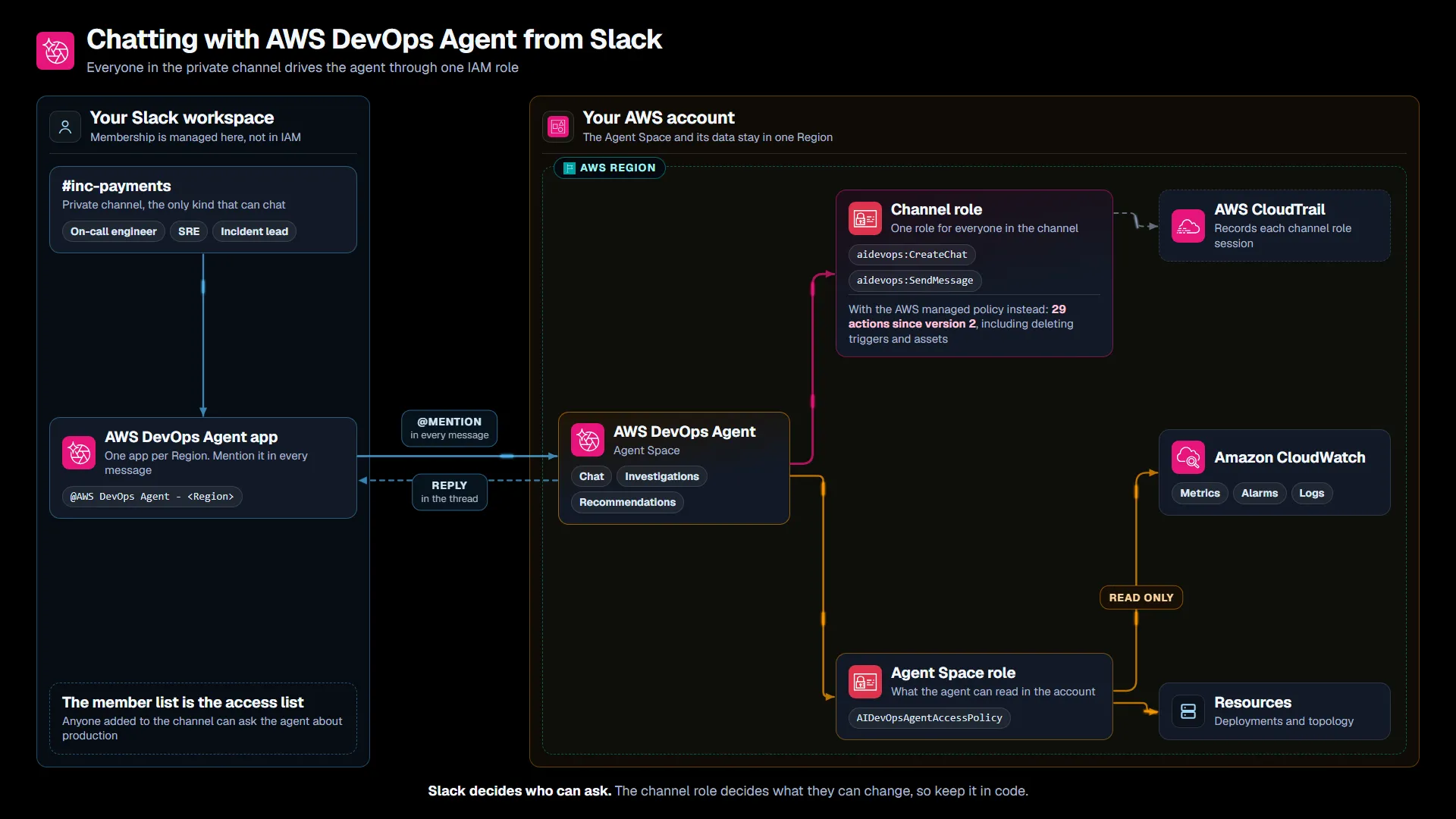
The channel name and its members are my example. The roles, the managed policies and their actions come from the AWS documentation and IAM.
The sample repo builds this in CloudFormation, CDK, and Terraform, with a chat-only channel policy by default. It also has a read-only audit script that lists every two-way channel and what its role can do, and a script that pulls a channel role’s sessions out of CloudTrail.
Your incident channel now has an IAM role
Once bidirectional mode is on, the channel has an identity. Every member of that private channel drives the agent through the same IAM role, and the agent answers with what its own Agent Space role can read: metrics, logs and topology across the accounts the Agent Space monitors. So the channel’s member list has become an access list to your production telemetry. It’s maintained in Slack, by whoever can invite people, and it isn’t part of your IAM access reviews.
Putting the agent where the incident already happens is the whole idea, and an on-call channel is a reasonable group of people to give that access. It still deserves the treatment you’d give an IAM group: a known owner, a short member list, and permissions that change only when someone decides they should.
Those permissions have already changed once. When you let the console create the role, it attaches the AWS managed policy AIDevOpsChannelAccessPolicy. Version 1 of that policy allowed two actions, aidevops:CreateChat and aidevops:SendMessage. Version 2, published on October 26, allows 29, including CreateTrigger, DeleteTrigger, DeleteAsset and UpdateRecommendation. Every role with the managed policy attached picked that up without a change on the customer’s side.
I think managed policies are the right call for the agent’s own read role, because AWS adds data sources and the agent needs to keep up. The channel’s role decides what a Slack thread can change in your Agent Space, so I’d own that policy and grow it on purpose.
What I’d check before turning it on
Review who’s in the channel. Keep it to people who would already have read access to the accounts the Agent Space monitors, and check membership when people change teams. A fresh private channel is easier to reason about than an old one with years of members.
Pin the channel’s policy. The sample repo’s default allows the two version 1 actions on one Agent Space, and the role’s trust policy accepts only that Agent Space. If you choose the managed policy, note its real ARN: arn:aws:iam::aws:policy/service-role/AIDevOpsChannelAccessPolicy. Without the service-role/ path, IAM says the policy doesn’t exist.
Test directed actions in a sandbox first. Directed actions are the changes the agent makes after an operator approves them, and the directed actions guide says every approval is attributable to the approving operator in CloudTrail. At the time of writing, it doesn’t say whether that approval can come from a Slack thread, or whose identity CloudTrail records when the channel acts through one shared role. Find out in a test Agent Space before you enable directed actions in one that has a two-way channel.
Watch the cost of a busy thread. At $0.0083 per agent-second, a sev-1 with a dozen people mentioning the agent adds up quickly. New customers get a two-month trial with 20 hours of chat a month, which is a good window to measure what a real incident costs.
Expect a few mechanics to trip people up. The app name includes the Region, every message needs the mention, and the user guide warns against uninstalling the app from the workspace, because it might not reinstall. Microsoft Teams got one-way notifications on October 16, but Slack is still the only place you can chat with the agent.
Treat the answers as a starting point. The user guide says the findings and recommendations come from language models and should be verified before you act. The agent’s investigation journal can’t be modified by the agents once written, which helps the incident review, and the repo’s CloudTrail script shows what the channel role did.
Where I’d start
Pick one service with a real on-call rotation and create a new private channel for its incidents, instead of turning this on in a channel everyone has joined over the years. Deploy the Agent Space with the chat-only role, run the audit script, and use the channel for the next few incidents.
You’ll know it’s working when the incident review can be written from the thread alone. That’s also the moment to decide, deliberately, whether the channel needs more than chat.
Who’s in your incident channel right now that you wouldn’t give read access to production?
Sources
- AWS DevOps Agent adds support for bidirectional Slack communication, AWS What’s New, Sep 11, 2026
- Connecting Slack, AWS DevOps Agent User Guide
- Working with directed actions, AWS DevOps Agent User Guide
- AWS DevOps Agent security, AWS DevOps Agent User Guide
- AIDevOpsChannelAccessPolicy, AWS Managed Policy Reference
- AWS DevOps Agent pricing, AWS
- Sample code for this post, GitHub
The opinions on this blog are my own and do not represent the views of my employer.